Know your odds before the fight
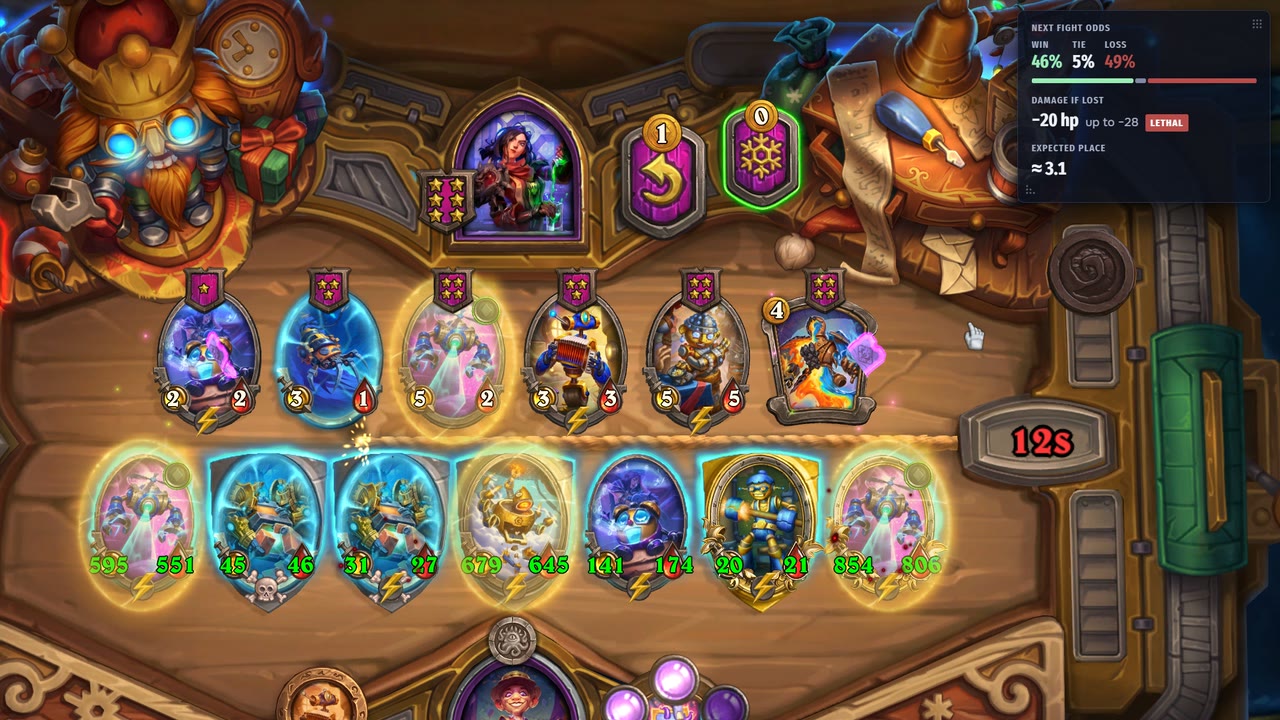
Tavern Seer is a free overlay for Hearthstone Battlegrounds on Windows. It shows your win chance, potential damage and predicted placement during the tavern phase.
480a6cb81cd1aa0f2d2fcccaa9a66aed382cc89021648c6e8efd954a0febc980VirusTotal reportFan-made · for Hearthstone Battlegrounds
See the fight before it starts
A battle simulator plays your board against the boards other players fielded on this turn, many times over, and the panel shows how often you win, tie or lose: the strength of your board right now. Move a minion and the number moves with it.
Check a move while you hold the card
Hold a minion over a board slot or over Bob, and the panel shows how your win, tie and loss chances would change, before you let go. It works when you move a minion, play one from your hand or sell one. A ≈ in front of the change means the app couldn't count every effect of that action.
Know what a loss will cost
If the fight goes wrong, the panel shows the usual damage and how bad it can get. When the worst case reaches your health, it says Lethal. Together with the win chance, it helps you see whether you can afford to upgrade the tavern or should strengthen your board first.
Track where your game is heading
A model trained on real games reads how your game has gone so far — health lost per fight, fights won, your spot in the lobby — and estimates your final place. It updates every turn.
Pick heroes and trinkets with the numbers
When the game offers you heroes or trinkets, each option shows its average place. The data comes from the app's statistics. A dash marks a hero or trinket with too few games to pin down its average place.
Watch a full game
A whole game with the panel on screen, from the hero pick to the last fight. Waiting and fights are sped up; every new number shows up in real time.
Your games help the numbers
Sent after each game
- The Battlegrounds game log, solo or Duos, with every name and account ID removed on your computer
- App version and game build
- Whether the panel was on screen
- Your Battlegrounds rating rounded to the nearest hundred (11000 and above as “11000+”), taken from the game client
Never collected
- Your BattleTag and other players' names
- Your account ID
- Games outside Battlegrounds
- Your IP address: we don't store it
To stop, turn off Send anonymized games in the Tavern Seer window. Games not sent yet are deleted at once. Sent games are kept for 5 months, then deleted; they can't be removed earlier on request: nothing in them points to you.
Questions
Is it safe? Can I get banned?
The app reads the log file that Hearthstone writes on your computer — the same file Hearthstone Deck Tracker reads. From the game's memory it reads your Battlegrounds rating and, for action previews, the held card, its destination and its board position. Drag data stays on your computer. It only reads: it doesn't change the game or its memory and doesn't press anything for you. You make every move yourself.
Is it a virus?
No. The app reads the Hearthstone log and, of the game's files, changes only its log settings. It connects to two addresses: updates.tavernseer.com for app and data updates and messages from us, and ingest.tavernseer.com to send anonymized games. It accepts an update or a message only if our signature on it checks out. SmartScreen warns because the beta isn't code-signed yet: Windows doesn't know the publisher, it hasn't found anything in the file. To check the installer yourself, compare its SHA-256 with the one next to the download button. VirusTotal report for version 1.0.0-beta.28
How do I install it?
Download the installer, accept the terms and allow one administrator prompt: the app raises the game’s log size limit in a file inside the game folder. Restart Hearthstone once. Step by step — on the installation page. Installation
Does it work in Duos?
Not fully yet. The numbers are built from solo games, and in Duos they would be wrong, so in a Duos game the panel shows no numbers. Keep playing as usual: we're collecting Duos games separately, and once there's enough data we'll start showing numbers in Duos too.